Objective
To troubleshoot GFCI outlets.
FAQ - GFCI
Q: What is GFCI?
A: GFCI stands for Ground-Fault Circuit Interrupter. GFCI outlets are a safety feature in our kitchens. These outlets monitor the flow of current and power off if a fault is detected. A fault may result in a shock but will prevent serious injury.
Q: What are the steps to outlet safety?
A: 1. Be careful with liquids around the outlet.
A: 2. Do not plug in damaged equipment or cords into an outlet.
A: 3. Static electricity can trip the GFCI Outlet.
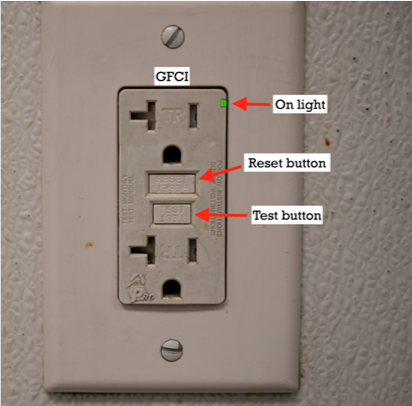
A: 4. Push the test button on GFCI outlet monthly to make sure it is working properly. The outlet will turn off and will remain off until the reset button is pushed.
Q: What is the difference between Normal Outlets VS. GFCI Outlets?
A: Normal outlets will not turn off if a fault is detected. Whereas GFCI Outlets have a test and reset button in the center of the outlet as well as a power indicator light.

Procedure on How to Reset a Tripped GFCI Outlet
|
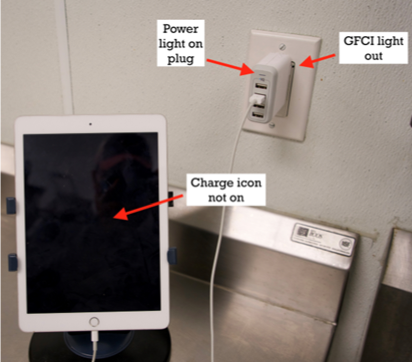
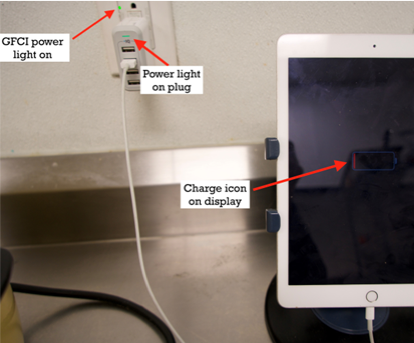
1. Identify a tripped outlet
|
|
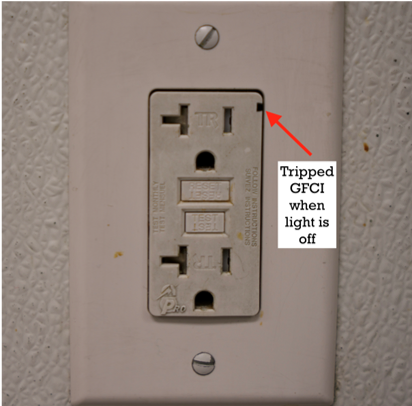
2. Tripped GCI
|
|
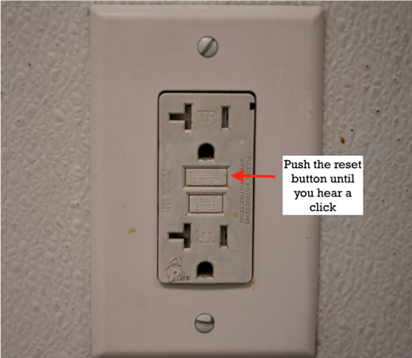
3. Reset Button
Note - A light press will not reset the outlet. You will feel and hear a click when the outlet is reset. Push the reset button in until you hear or feel it.
|
|
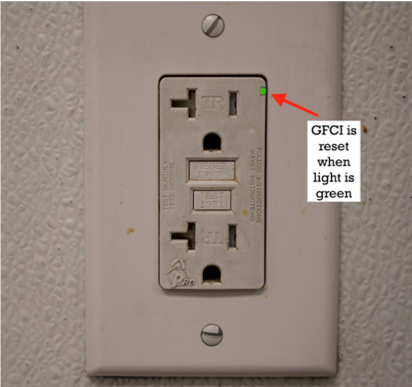
4. Reset Light
|
|
5. Test Outlet
Note - It may be an issue with our appliance if the power indicator is on, but does not work.
|
|
6. GFCI Outlet
Note - The test button turns the outlet off. Push the reset button to turn the outlet back on.
|